How to Keep Your Sanity with Never-Ending SharePoint Changes
I first blogged about this topic back in 2016, right around the time SharePoint began its transformation from a classic to a modern experience. New look and feel, new site architecture, new site types, and completely new terminology. It was a tremendous change back then, as many of the things and best practices we had established over the years changed overnight. So, back in 2016, I wrote a post with several recommendations on how to embrace this change without going insane with all the changes.
I even joked in that article that if you want to mitigate stress and not go insane with all the new features thrown at you, you need to consume some alcohol. Fun fact, years later, I got an email from some lady who worked for a law enforcement agency asking me to remove this reference, as “it helped spread and advertise alcoholism” to my blog visitors. Of course, as I found this request absurd, I never removed it.
Fast forward 10 years, and the topic of ongoing change remains very relevant. Though we have had modern experience for close to 10 years now, there are always ongoing UI changes, new web parts, and Copilot AI integration. So I thought I would rewrite this old post of mine and share new and additional tips on how to stay sane with the changes!
Tip # 1: Microsoft 365 Roadmap
Microsoft maintains a Microsoft 365 Roadmap that outlines the timing of changes and the future roadmap. It is always a great resource to reference.

Tip # 2: Enroll yourself in the Targeted Release program
This is actually one of the best ways to stay informed about upcoming changes. When Microsoft implements changes and new features, they release them gradually, first making them available to the Targeted Release Program and then to the general public. While you can switch your entire org to the Targeted Release program, I do not recommend it. It also allows you to designate certain users and just enroll them. This might be great for the IT/Admin team and SharePoint champions in your org. The Targeted Release Program will allow you to test the new capabilities. However, keep in mind it might be buggy.
I actually explained how to enroll users into the Targeted Release Program here.

Tip # 3: Read the Message Center
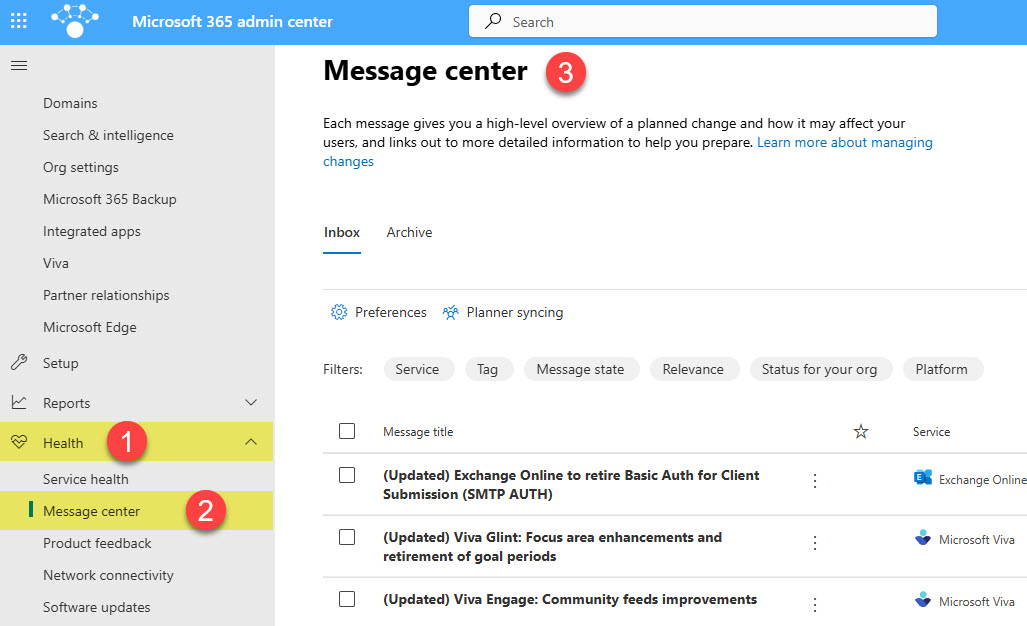
If you are a global Microsoft 365 Administrator, you also have access to the Message Center, which provides constant updates and warnings about upcoming updates coming to SharePoint and other applications. Bonus, you can also sync the messages from that Message Center to Planner – this would allow you to organize and prioritize the upcoming changes in case you need to test them or conduct user training. I explained this trick here.
Tip # 4: SharePoint Newsletter/Community of Practice
If you have many employees in your org, I have seen tremendous success with some periodic newsletters you can create to communicate the changes. I have seen some of my clients create dedicated SharePoint sites for that and using News Web Part to document upcoming changes. That allows them to also create newsletters/news digests to email employees with regular advice. I have also seen some of my larger clients create SharePoint communities in Viva Engage, where users could exchange tips and advice on SharePoint.
Tip # 5: Live Training
Live training has always delivered the best ROI for user adoption. A quick refresher for the employee won’t hurt. And it does not even need to be anything long or fancy. A 30-60-minute lunch-and-learn could go a long way.
Tip # 6: YouTubers and bloggers
One way I use all the time to get familiar with new features coming to SharePoint and other apps is the many YouTubers and bloggers who are early adopters, sharing the capabilities and limitations of the new features. Daniel and Darrell have the whole podcast show dedicated just to the new stuff.
Tip # 7: Drink Alcohol
If all else fails, a glass of wine or a shot of nice brandy will help. How do you think I stay sane and motivated with the hundreds of changes happening in SharePoint, Teams, Lists, and OneDrive? 🤣🤣🤣 Just FYI, Hennessy is my favorite! Lehaim! 🍷

Share Article