< All Articles

Viva Connections Events Card

Posted on March 23, 2026
Microsoft 365

There have been some cool additions lately to the list of cards available in the Viva Connections Dashboard. I have already blogged about some of them previously. Today, I want to introduce you to another card we now have called Events. I will explain how it works and how it differs from the SharePoint Web Part “cousin”.

How to add Viva Connections Events Card

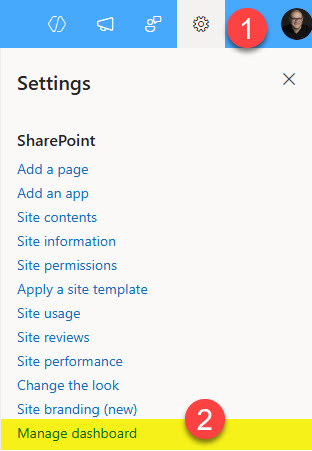
  1. If you are a Site owner, click on the Gear Icon > Manage dashboardEventscarddashboardsharepoint1
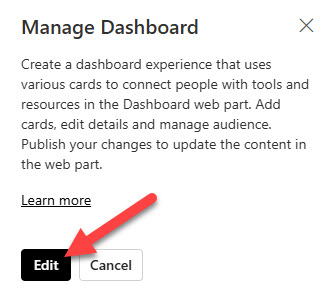
  2. From the right-hand-side panel, click EditEventscarddashboardsharepoint2
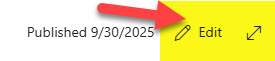
  3. Click the Edit button againEventscarddashboardsharepoint3
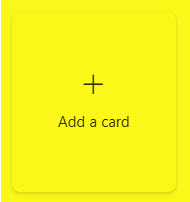
  4. Next, click +Add a cardEventscarddashboardsharepoint4
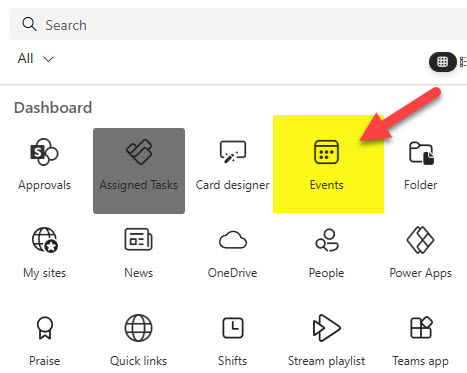
  5. From the list of all available cards, choose EventsViva Connections Events Card
  6. This will add the Events card to the dashboard. By default, it will be blank. To display events, click the Pencil icon.Viva Connections Events Card
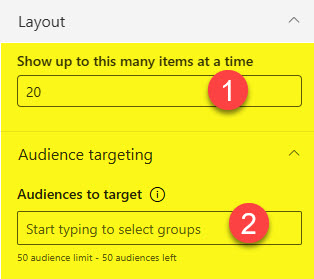
  7. On the configuration screen, you can type the title and select the card size (Large or Medium)Eventscarddashboardsharepoint7
  8. Next, you can select the source (SharePoint Sites) to display events from. You can even specify the category of Events and the date range.Viva Connections Events Card
  9. Towards the bottom, you can set up Audience Targeting.Eventscarddashboardsharepoint9
  10. Once published, this is what the card will look like on the page.Viva Connections Events Card

Nuances

  • Unlike the Events Web Part in SharePoint, the Events Card does not allow you to add events to it; it only displays events from Events lists on various sites.

About Me

I’m Greg Zelfond, a U.S. based SharePoint consultant, and I provide affordable out-of-the-box SharePoint consulting, training, and configuration assistance to small and medium-sized businesses all over the world.

Need help?
Weblinkcard 1353049358

Dashboard Web link Card

Most of the articles on my blog are about SharePoint Web Parts. They are the core building blocks of SharePoint. However, Microsoft just made the Dashboard Web part available on…

Read More
Onedrivecard 2606438433

Viva Dashboard OneDrive Card

I usually blog about SharePoint Web Parts and don’t spend much time on Viva Connections or Viva Dashboard. But lately, Microsoft added some really nice-looking cards that make the Viva…

Read More
Playlistvivacard 1891193185

Dashboard Stream Playlist Card

There have been quite a few improvements lately in the Viva Connections “universe”. With the addition of new Viva Connections cards and the availability of the Dashboard Web Part on…

Read More