SharePoint Pages Content Pane
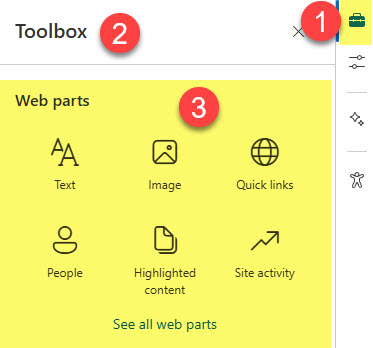
As SharePoint pages evolved over the years, they gained numerous new design elements that assist site owners in creating visually appealing and functional page designs. One feature that stands out is called Content Pane. It contains a total of three elements and serves as your companion in creating a pleasant page experience in SharePoint. So I would like to explain what it is and go over each of its three elements: Toolbox, Design Ideas, and Properties.
Toolbox
The first function of the content Pane is Toolbox, where you can add web parts, images, and even entire sections with text and pictures already populated. I explained Toolbox in greater detail here.
Design Ideas
If you are struggling to put together a nice-looking page, Design Ideas is here to help. Just like in PowerPoint, it will help you create a nice-looking design and show you what is possible. Check out this article to learn more.

Properties
Finally, we have the Page Properties sidebar. It is a contextual Properties function that displays the properties of a page or a Web Part, depending on what you have selected on the page.

Page Properties (when the page is selected on the screen)

Web Part Properties (when the Web Part is selected on the screen)

Share Article