< All Articles
How to Find Unlicensed OneDrive Accounts
The report I am about to describe is necessary for organizations of all sizes. Microsoft made an announcement that any unlicensed OneDrive accounts (i.e., from past employees) will be archived and eventually deleted unless the license is added back to them or content is moved elsewhere. If you’re a small firm, identifying those accounts isn’t a big deal. But for medium- to large companies, especially with higher turnover, this can become a nightmare to manage. Luckily, we now have a dedicated report that allows us to find that information.
- To access the Unlicensed OneDrive Accounts Report, go to the Microsoft 365 Admin Center first
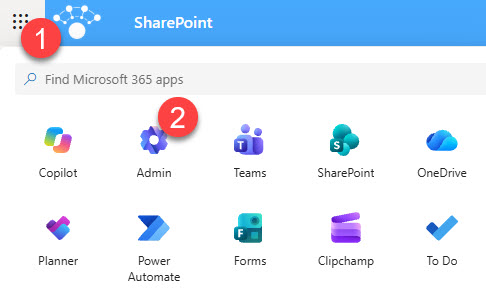
- Under Admin centers, click on SharePoint (admin center)
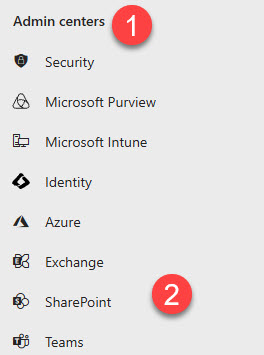
- Once in the SharePoint admin center, under Reports, click OneDrive accounts

- The main area shows accounts that have been unlicensed for more than 93 days, broken down by category (Retention period, Active user with no license, etc.). To download the entire report in CSV format, just click Download report.

- Also, to see additional details and take action on the given account (i.e., delete or enroll in billing), click View more details.
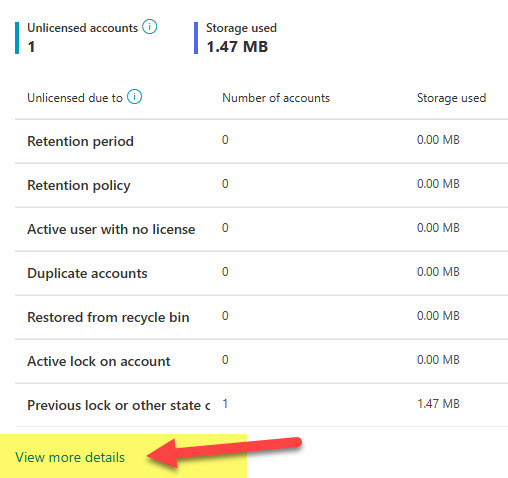
- From there, you can take an appropriate action as necessary

How to Mitigate the Unlicensed OneDrive Accounts Situation
You have 3 options:
- Option 1: Assign a license back to the user
- Option 2: Move the content you need somewhere else and delete the account. For this option, you will need access to the former employee’s OneDrive first, which I explained in this post.
- Option 3: Turn on billing and let the account live in the archive
Nuances about the Unlicensed OneDrive Accounts report
- Must be a SharePoint Administrator
- Must have the Advanced Management License (SharePoint Advanced Management or SAM)

Share Article