< All Articles
How to create Forms and Surveys from the Forms Template Gallery
One issue that I often struggle with when creating Forms and Surveys using the MS Forms application is the content and proper structure/flow of the form. True, we now have Copilot to help us with this. However, for the most frequent types of forms and surveys, Microsoft also created a database of templates that give you a good starting point as well. In this article, I will explain how to take advantage of the Forms Template Gallery.
- Navigate to the Forms App by clicking Microsoft 365 App Launcher> Forms
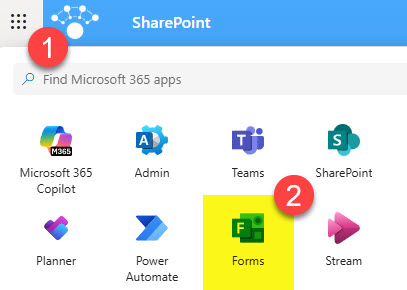
- The templates should be displayed front and center by default. If they don’t, click on Explore templates.

- You will see some default Forms templates. To view the entire gallery, click on Template gallery.

- Forms Templates will be organized by Category.

- Once you click on a template, it will automatically create a Form under your account with all the questions, formatting, etc.

- Once a Form is created from the template, it can be customized as necessary. At this point, it is stored under the My Forms tab.
Nuances about the Forms Template Gallery
- You can create your own Forms template as well; however, it won’t be saved under the Template Gallery. Instead, it can be shared as a link with others – I explained it in an earlier post.

Share Article