How to add an email address to a People Web Part
OK, I know this might be a weird thing to blog about when everyone blogs and records videos about Copilot, but this little trick made me a hero with one of my clients. They wanted to list an email address within the People Web Part. They used it extensively on their pages listing various team members. Let me show how I achieved it.
The problem with Email Address on the People Web Part
Here is the problem with displaying the email address in the People Web Part. This web part pulls all information from Entra ID. It pulls and displays the email address only if the user’s title is not filled in the employee directory. Because of the limited space on the People Web Part, it can display only 2 lines of information. The first one is always the name. The second one is the title. If the employee’s title is blank in the directory, it shows the email address. So with this client, it was hit or miss – some employees had an email address shown, and some did not.

How to add an email address to a People Web Part
Here are instructions to add the email address:
- Edit the page
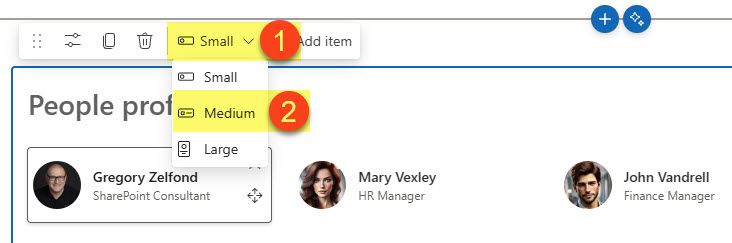
- Switch to Medium Card from the drop-down
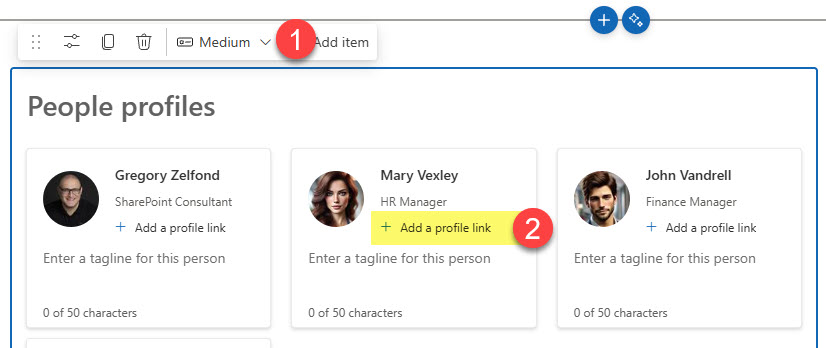
- Click on +Add a profile link
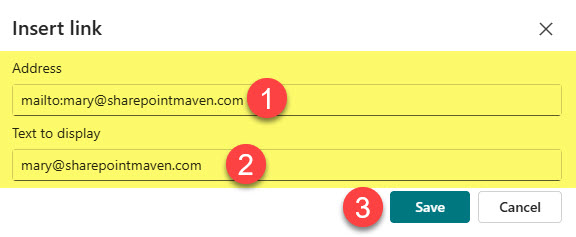
- Click the empty space and add a mailto: email address. I explained this trick in a separate post of mine.
- You’ll end up with a clickable email address!


Share Article