How to implement SharePoint Intranet in 5 weeks
In this article, I would like to share my philosophy of implementing a SharePoint Intranet. I am always baffled when I hear that it takes companies months and years to implement one. This usually happens when companies get too carried away by some unusual design requirements or functionality that they can actually survive without. That’s why I strictly stick to the SharePoint out-of-the-box functionality. This assures there is no additional software to procure and no additional functionality to learn. When I implement a SharePoint Intranet for my clients, I typically complete the project in 5 weeks. In this post, I will share my approach and methodology, which I introduced in 2017 and continue to use to this day.
Assumptions
It is essential to note a few key assumptions for this approach to be effective and successful.
- As mentioned above, the assumption is that you use only SharePoint OOTB and do not use any 3rd-party themes, add-ons, or web parts. Using those is OK, but it will definitely extend your timeline (and budget)
- When I say SharePoint Intranet, I mean the Home Site and several Communication Sites (one for each department). I am not including Team Sites or Teams here, even though I could. Document Management and collaboration are subject to additional architecture and decisions, such as team sites, teams, channels, and metadata. They obviously could be included, but would increase the scope.
- I assume a reasonable number of sites for the initial implementation, like 10-12. Obviously, for some large organizations, the scope of work will be extensive due to the number of sites. Regardless of your organization’s size, I always recommend starting small with a few initial sites and growing organically.
- I understand that everyone is busy and has other priorities. When I say 5 weeks, that is the shortest and most reasonable time to implement. If need be, it could be extended to accommodate other priorities.
- And finally, this is extremely important!!! You need to recognize the fact that Intranet implementation is not a once-and-done deal. The intranet is an ongoing project that will likely continue indefinitely, with constant improvements, design changes, and other updates. It is a living organism. The 5 weeks we are discussing are specifically for the MVP (Minimal Viable Product), which will enable content managers to post updates and provide employees with a dedicated portal to access and become accustomed to.
Below, I outline the weeks and steps completed during the week.
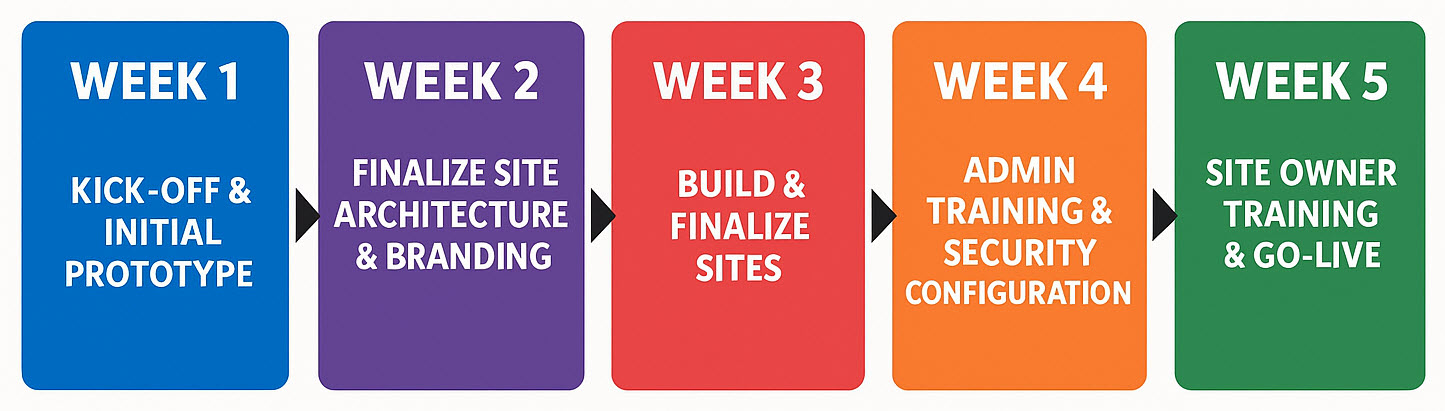
Week 1: Kick-Off & Initial Prototype
- Kick-off meeting with stakeholders
- Demo examples of the intranet
- Define Homepage look & feel
- Identify Department sites and agree on a template
- Build draft Intranet home site
- Build draft Department site
Week 2: Finalize Site Architecture & Branding
- Status meeting and progress review
- Apply feedback and changes
- Finalize department site template/structure
- Configure intranet Theme (branding, colors, logo, fonts)
Week 3: Build & Finalize Sites
- Populate sample homepage content
- Create all department sites based on the template
- Finalize homepage design
- Finalize site and Hub navigation
- Populate sample/initial content
- Status review and feedback
Week 4: Admin Training & Security Configuration
- Deliver IT Admin training
- Configure AD groups (if applicable)
- Set up site security
- Configure admin settings (external sharing, link types, etc.)
Week 5: Site Owner Training & Go-Live
- Deliver Site Owner training (content owners)
- Set up Viva Connections
- Final homepage and department site cleanup
- Go-Live
- Celebrate with plenty of alcohol 🍷
If you are interested to learn more about my Intranet Implementation, please visit this page for more information.
And if you would like to see examples of Intranet Homepages, check out my portfolio here.

Example of a Company SharePoint Intranet Homepage

Share Article