Best Practices for Organizing Company Policies in SharePoint
I frequently receive this question from my clients, so I decided to write an article on it. It has to do with the options available when it comes to organizing and storing company policies, forms, and templates in SharePoint. It could be other types of documents as well, but what is unique about those documents is that they typically need to be available to the entire organization on a view-only basis while also being editable by a select group of users.
So, below I would like to list a few available options, as well as the pros and cons of each. I strongly suggest you read this post till the end, as Option 3 is my favorite and is considered the best practice.
Option 1: Single Site/Library with folders
The first option assumes there is just one library for everything. The library would be editable by a select few people (policy owners) and read-only by everyone else. Documents would be organized via folders, and those folders could then be used to set unique security on the files.
Pros
- Single library to maintain
Cons
- A pretty disciplined approach is required when it comes to document updates and security
- Little ability for any custom processes, as all files reside in a single library
- Prone to errors where users might inadvertently see pending docs
Option 2: Single Site/Library with metadata
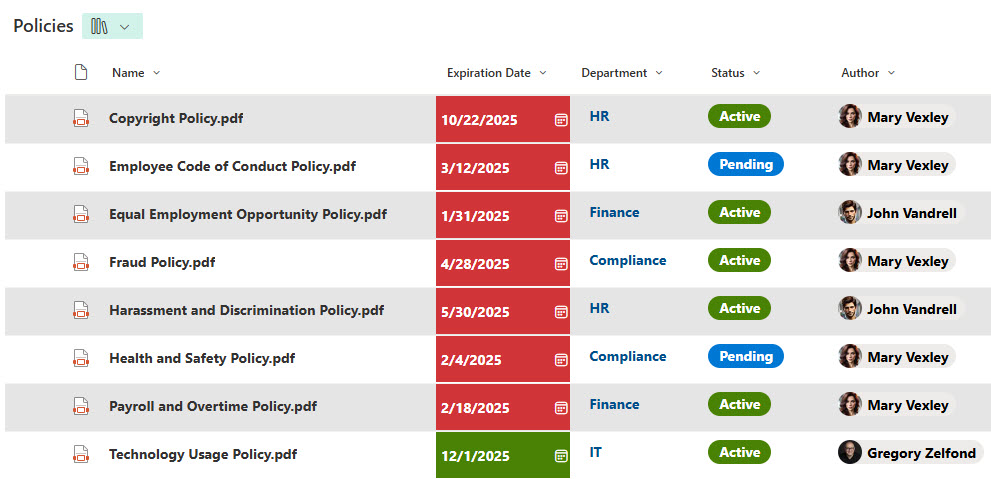
The second option also uses a single library; however, it relies on metadata to track document status. The idea is that there will be no folders, and users will use the Status column (e.g., Approved) to view the document’s status.
Pros
- A bit more elegant solution compared to Option 1
Cons
- Requires a bit of setup and discipline
- Since there are no folders, no way to set unique permissions for different types of policies
- Prone to errors where users might inadvertently see pending docs
Option 3: Separate Sites for different editable and final versions
The third option is my favorite and the one I consistently implement for my clients. The idea is simple and follows best practices for SharePoint. Essentially, there are separate libraries for final documents and those that are editable. This way, edits, changes, and collaboration on the policies occur on private and restricted sites (i.e., the Human Resources private site), and final documents are copied over to another site (Communication Site/Intranet), where they are read-only for everyone.
Pros
- A foolproof method that assures that only the final documents are seen by employees.
- Since editable documents will be residing on other (internal) sites, custom department processes can be implemented within each department for policy updates.
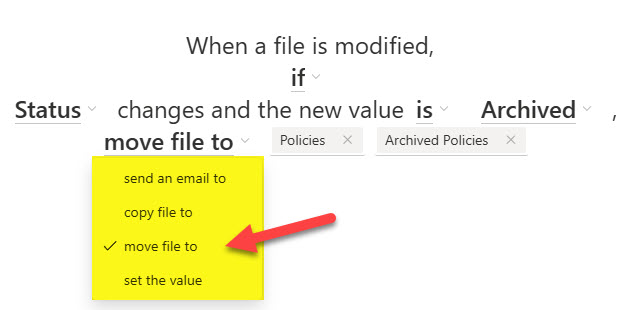
- The new Move/Copy Rule can expedite publishing final versions.
Cons
- Requires a bit of upfront setup and education, but well worth it!

Share Article