How to Create a Calendar Using SharePoint Lists
I introduced you to the concept of Lists back in 2021 when Microsoft modernized its look and feel and functionality. We tend to think of lists as a Table or a Grid view. It also happens to be a default view on a List. In some instances, you might want to start with a different one. A good example is when you try to use a list as a calendar of some sort (i.e., office calendar). True, you can first create a list (grid view) and then create a calendar view off it. But now you can also create a calendar right away by using the built-in functionality.
How to Create a Calendar Using SharePoint Lists
As mentioned above, you can actually create a Calendar view of any list that you have. If you say, created a list of projects or events, in Grid View, you can easily add a Calendar View to it. I explained this in this article.

However, sometimes you might start from scratch and just need to create, say, an office calendar. In this case, you can save time by creating a Calendar straight from the template. Let me show you.
- From a SharePoint Site where you want to create a list, click New > List
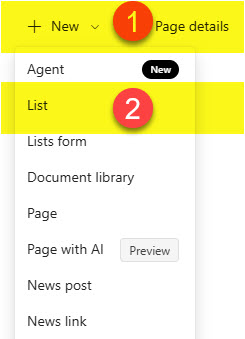
- From the list of available templates, click Calendar

- Give your Calendar (List) a name and click Create

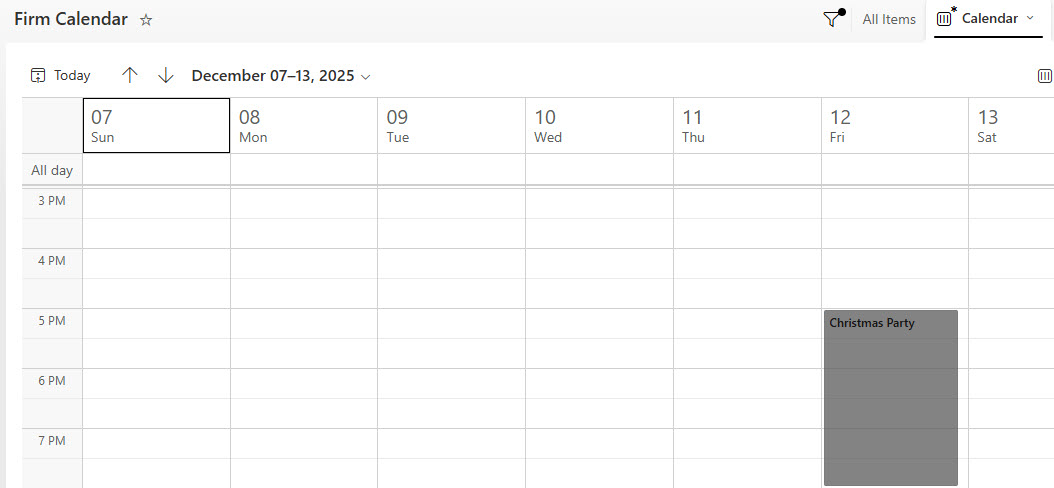
- That’s all – the calendar has been created! It will display the Calendar View right away.

- If you click on the All items View, it will display the good old Grid View we have in Lists. You can add entries (events) in either the Grid View or the Calendar View.

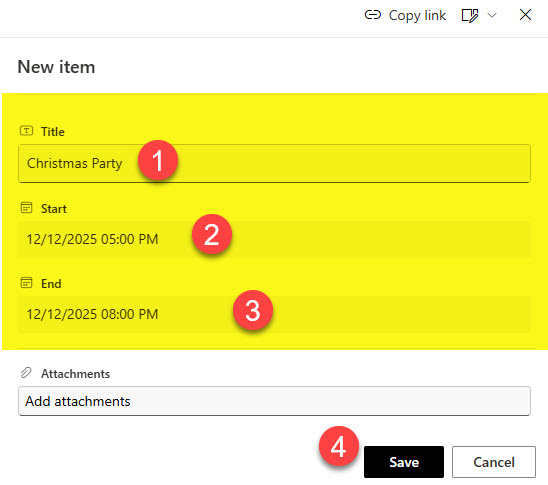
- This is how the event will appear on the calendar.
Important Notes and Nuances about the Calendar Template
- When you create a Calendar using the method described above, it automatically creates Start and End Columns (Date Columns). These columns are mandatory for the Calendar to work.
- Calendar View becomes the Default View of the List. Of course, you can make any other view the default one as necessary.
- You can always create additional columns on a list, as well as format/color-code the calendar. I actually explained how to do this in this earlier article.
- If you would like to see some additional examples and images of a typical List Calendar, feel free to check out my portfolio here.

Share Article