Why SharePoint makes sense for nonprofits
SharePoint is a powerful collaboration and content management tool used worldwide by organizations. As I consult clients and help them transition to SharePoint, nonprofits benefit significantly from migrating to SharePoint and all the other Microsoft 365 apps. So, in this article, I would like to summarize the top 10 reasons why SharePoint makes sense for nonprofits.
Reason # 1: Nonprofit Discount
Nonprofits often have limited budgets and resources, but thanks to Microsoft, they can receive significant discounts on Microsoft 365 licenses.

Reason # 2: Low maintenance
This reason would be true for any type of organization, not just nonprofits, but it is probably vital for nonprofits that typically have limited budgets and higher turnover. Once migrated, SharePoint does not require much maintenance, especially if they stick to SharePoint out of the box.
Reason # 3: The Intranet to improve communications
With a non-profit’s typically diverse user base (employees, board of directors, volunteers), it is important to standardize communication and common policies. SharePoint Intranet allows for that. Check out this article on how to create a nice-looking Intranet Homepage, and check out this resource for the other examples.

Reason # 4: Board of Directors Site
Many nonprofits have a Board of Directors – a group that has periodic meetings and needs to have access to various organization resources like Bylaws, charters, etc. SharePoint makes perfect sense to create a Board of Directors site that would serve as a single source of truth for such use cases. By the way, I sat on the Board of Directors for a PMI local chapter back in 2012-2014, and we successfully used SharePoint to collaborate among ourselves. As a matter of fact, I even published an article with step-by-step instructions on how to create a Board of Directors – check it out.

Reason # 5: Committee Sites/Teams
Nonprofits typically have many subcommittees that need their own space to collaborate and communicate. I often create a dedicated site connected to Microsoft Teams for each committee, so each committee has space to store files, chat, and manage tasks—all in one place.

Reason # 6: Volunteer Management
Nonprofits often need volunteers to manage and share information with. Depending on their level of involvement, you might need to set them up with a license or treat them as external users. I described the various options here.
Moreover, if you would like to quickly create an informational site for your volunteers, one of the existing Microsoft templates called Volunteer Center can be used. This template will add the pages and web parts to accommodate any content you might have on the site. I explained how to apply such a theme in this article.

Volunteer Center SharePoint Site template available in SharePoint Out of the Box
Reason # 7: External Sharing
Kind of related to the above, but nonprofits, just like many other organizations, need to collaborate with other firms and share content. SharePoint external sharing is pretty straightforward and seamless these days. Check this out for additional information.
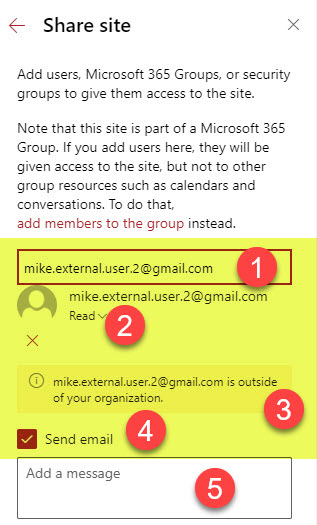
An example of external sharing of SharePoint site
Reason # 8: Grant Management
This might not apply to all nonprofits, but over my 12+ years of consulting, I have had a few clients who needed to manage grants they had applied for. Each grant had a set of supporting documents, and once applied for, you had to manage grant status, deadlines, etc. For this requirement, I find the document sets a superior option.
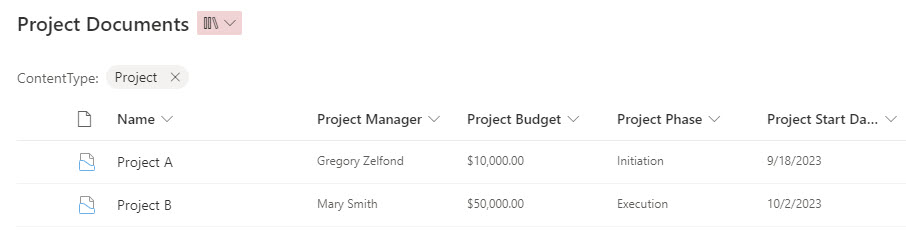
An example of a Document Library configured with Document Sets (that can be used to manage and organize Grant Docs)
Reason # 9: Other applications within the Microsoft 365 eco-system
Another reason why SharePoint makes sense for nonprofits has nothing to do with SharePoint. Once a nonprofit switches to SharePoint Online, it also gets the whole Microsoft 365 ecosystem. Microsoft 365 has many other wonderful applications that nonprofits can utilize, such as Teams, Forms, Lists, Planner, and others.

Reason # 10: Retention & Records Management
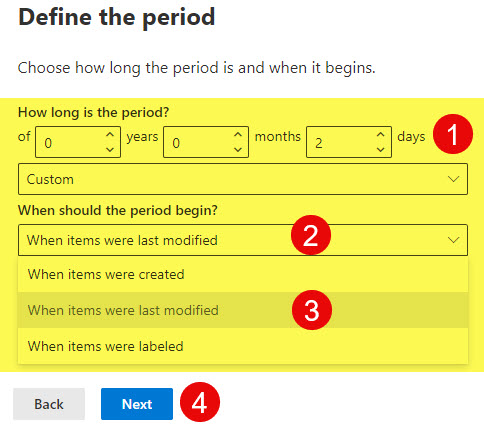
Many nonprofits might have local, state, or government regulations requiring them to retain certain data for a period of time. As I previously documented on my blog, Microsoft 365 has superb retention capabilities within the built-in Microsoft Purview Compliance Center.

Share Article