6 Web Parts to create a Call to Action in SharePoint
A call to action is something that is extremely important to the success of SharePoint Intranets. When your employees visit your company landing page or a Human Resources Department site, you most likely want them to take some action. Perhaps register for an event, read an important announcement, enroll in company training, or fill out a form. Whatever it is, there are several ways to achieve this in SharePoint, which is what I’d like to explain in this article.
1. Call to Action Web Part
The first method to create a Call to Action is to use a surprise, surprise, a Call to Action Web Part. Yes, we have one explicitly dedicated. It allows for a visually appealing background image with text overlayed on top and a Call to Action (CTA) button pointing to a URL.
- Edit the Page and choose the Call to Action Web Part

- Configure the settings – you can change the background image, alignment, button label, and text.

- This is what the Call to Action Web Part looks like in SharePoint once configured.

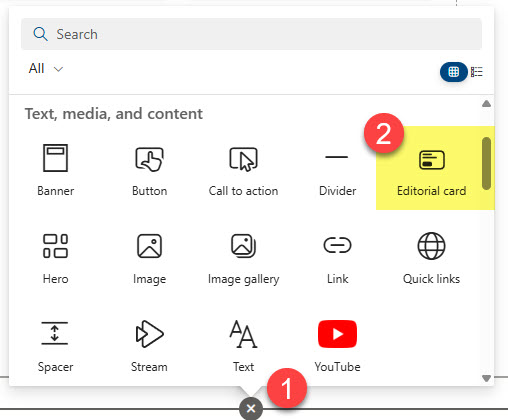
2. Editorial Web Part
The second way to create a CTA in SharePoint is to use an Editorial Web Part. It is a relatively new edition in SharePoint, and I blogged about its extensive capabilities here. The Editorial Web Part is like the CTA Web Part I described above, but it offers more extensive configuration capabilities and formats.

3. Countdown Timer
If you want your employees to take action and be reminded of the approaching deadline, look no further than a Countdown Timer Web Part. Once again, I blogged about it previously. Its biggest appeal is the ability to set a deadline and the changing ticking clock towards the deadline. You can also count up from a date/time in the past. Besides, it also allows you to add a CTA button with a link.

Example of a Call to Action built with the Countdown Timer Web Part
4. Hero Web Part
Another way to capture employees’ attention is to use a Hero Web Part. While it is meant for a nice way to spice up the Intranet landing pages, with visually appealing tiles and images, it does allow the addition of a CTA text linked to a URL as well. In addition, you can embed a video within a tile too, prompting the user to watch it without leaving the page.

5. Quick Links Web Part
And, of course, we always have the good old Quick Links Web Part. While its primary use case is just listing links, nothing stops you from using them for an engaging link or call to action. Especially if you add some custom images to them. Check out this post for instructions.

Example of a Quick Links Web Part in Tiles Layout

Example of a Quick Links Web Part in Grid Layout (with stock icons)
6. Image Web Part
Another CTA option is to use an Image Web Part. While you might primarily use it to display images on a page, you can configure the web part’s extensive properties to convert it to a CTA. For example, you can add overlay text and a clickable URL, making it a nice-looking CTA.
- Edit the Page and select the Image Web Part

- You can adjust the background image, link/URL, and whether or not you can add text over the image (in our case, it is necessary for the Call to Action to work)

- The Text Over The Image can be customized further with additional formatting as well!

- And this is what the final Call to Action using the Image Web Part might look like.


Share Article