How to Add Callouts to a Video in Clipchamp
I already blogged quite a bit about the new features we now have in Clipchamp (formerly Stream). I absolutely love the ability to embed MS Forms and Quizzes inside the video – read this article of mine to learn more. Today, I want to explain another related feature – the ability to add call-outs inside the video as well.
What are Callouts?
I actually had this happen to me quite a bit. I would record a video, then forget to mention an important detail, or perhaps misspoke a word or two. Usually, that would have been recording a new video or doing some editing to this one. Luckily, we now have another “light-weight” option – Call Outs.
Callouts allow you to add text overlays at designated times in the video to provide more information, clarity, or a link to a document/file.
How to add Call Outs to a video
- You would add Callouts the same way you would embed MS Forms. Click the video so that it opens in the browser, then click on Interactivity, then Add New > Add callout
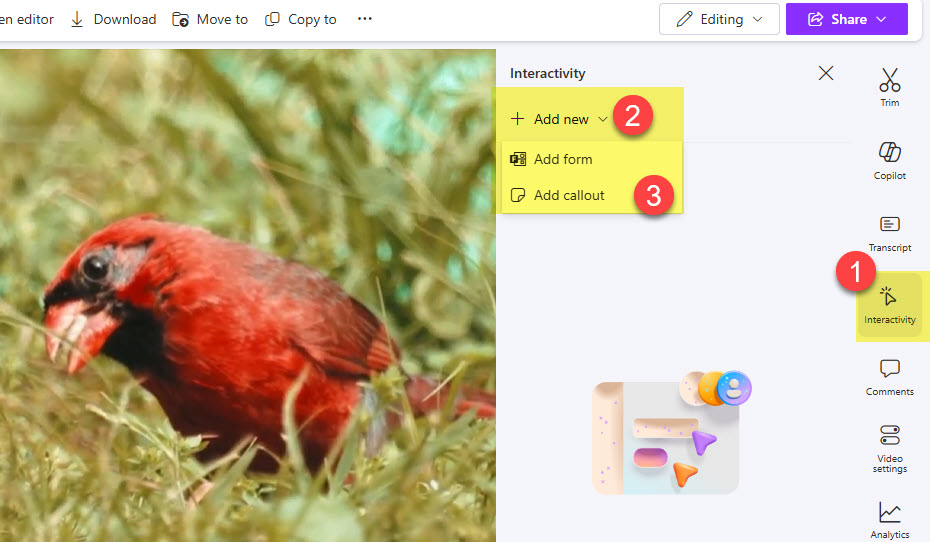
- At this point, you would need to enter information about the callout. You can adjust the color of the background, start, and end timestamps for it to appear in the video. To add text, double-click the callout itself.

- You can also add a link to a document inside the Video Callout. For that to happen, just start typing the document name and choose the one you want to link.
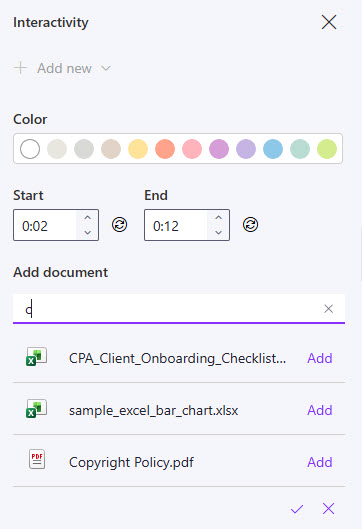
- Below is how the linked document will appear in the video callout.

- There is also some limited Analytics available for Callout engagement as well. To access it, click on Analytics, then Interactivity analytics.


Share Article