Agent Assets Document Library
For quite some time, we only had 4 types of libraries in SharePoint: Document Library, Site Assets Library, Site Pages Library, and the Preservation Library. I blogged about them just months ago. We literally had these 4 libraries forever in SharePoint. But in the age of Copilot, things change quickly, so in 2026 we added another library specifically for Agent skills. Let me explain its purpose.
What are Skills in SharePoint?
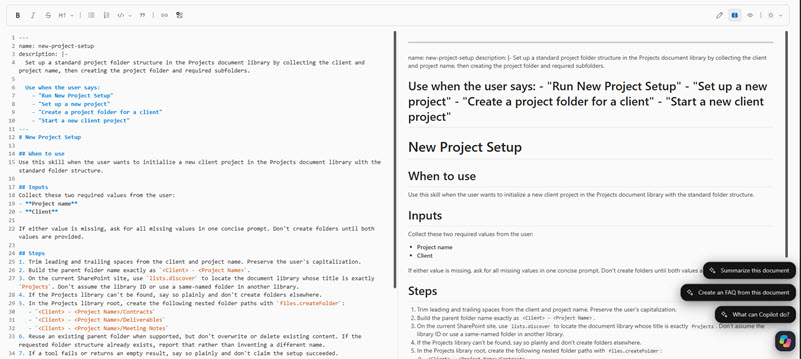
I suggest you reference this post to learn more about Skills, but in short, a skill is a special file that contains step-by-step instructions for Copilot AI. It is a Markdown file, so it has an .md extension.
What is the purpose of the Agent Assets Library?
The library’s purpose is… surprise, surprise, to store those .md skill files that you create on a SharePoint site.
How is the Agent Assets Library created?
When this capability was first released, you had to enable it via Site Collection features, which I documented in an earlier article. You can still do that, but you don’t really need to anymore. The Library is automatically created on a site the first time you create a skill via Copilot Chat.
Structure of the Agent Assets Library
The Agent Assets Document Library contains a folder called “Skills”.

Inside, there is a folder named after the skill.
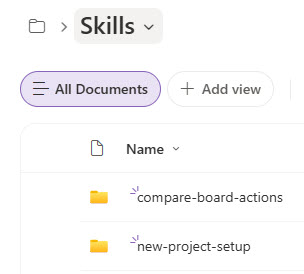
Inside that folder is SKILL.md, a text file that contains instructions.

Nuances
- DO NOT rename the SKILL.md file to any other file name. If you do, the skill will not be found and will not work. This is an error message you will receive when trying to list or load the skill via Copilot Chat
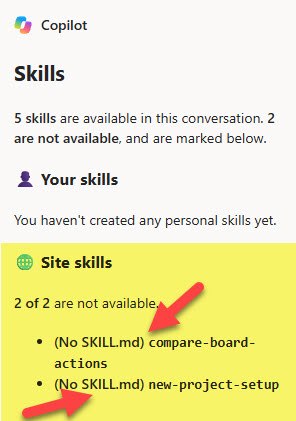
- DO NOT move the SKILL.md file to any other location, even within that same Agent Assets library. The folder hierarchy for the SKILL.md file is mandatory for it to work (Agent Assets Document Library > Skills > [Skill Name Folder] > SKILL.md)
- While you can upload other file types to this library (i.e., Word, Excel, PDF), it is not recommended. The library is not meant to be a collaboration-type library.
- The Agent Assets Library has full document management features (i.e., Version History, download, sharing) like a normal document library.
- The Agent Assets Document Library cannot be deleted. Once created, it is permanent on a site. This makes sense, as its deletion will break all the skills on a site.

Share Article